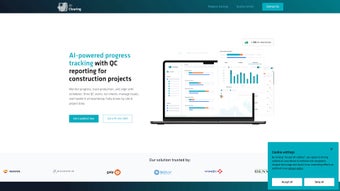

Download AIclearing – Advanced Construction Monitoring Tool
Introduction: Transforming Construction Oversight with AI
In the fast‑moving world of construction, staying ahead of schedule, budget, and quality demands a tool that can keep pace with the site’s daily changes. AIclearing answers that call by merging cutting‑edge artificial intelligence, drone‑captured imagery, and cloud‑based analytics into a single, easy‑to‑use platform. Unlike traditional manual take‑offs or spreadsheet‑heavy progress reports, AIclearing automates the entire monitoring cycle, delivering real‑time 3D site visualizations, instant discrepancy alerts, and predictive deadline estimates.
The result is a dramatic reduction in re‑work costs, lower litigation risk, and clearer communication among owners, contractors, and consultants. Whether you’re managing a high‑rise tower in a megacity or a remote infrastructure project, AIclearing provides a secure, web‑based environment that scales with project size and complexity. The platform’s architecture is built on a multi‑tenant cloud model that guarantees high availability, while role‑based access control ensures that each team member sees only the data they need.
By leveraging AI, the system can learn from each new dataset, continuously improving its accuracy and reducing the time needed for manual verification. This review walks you through the core capabilities, step‑by‑step installation, system requirements, and the pros and cons that matter most to construction professionals. By the end, you’ll know exactly why AIclearing is quickly becoming the go‑to solution for firms that want to turn raw site data into actionable insight—fast, accurate, and with minimal manual effort.
Overview & Core Features: What AIclearing Brings to the Job Site
AIclearing’s value proposition rests on three pillars: data acquisition, intelligent processing, and intuitive delivery. The platform ingests high‑resolution drone orthomosaics and point clouds, then applies machine‑learning models trained on thousands of construction projects to identify progress, deviations, and potential risks. All results are presented through interactive dashboards and downloadable PDF reports that can be shared instantly with stakeholders. Below is a snapshot of the most compelling features that set AIclearing apart, followed by an explanation of how each feature translates into real‑world benefits for site managers, engineers, and owners.
- Automated 3D Site Modeling: Generates accurate, up‑to‑the‑minute three‑dimensional representations of the entire construction footprint, allowing users to rotate, zoom, and slice models for detailed inspection.
- Progress Quantification: Calculates volume‑based progress percentages for earthworks, concrete pours, and structural assemblies, delivering a single metric that aligns with contractual payment milestones.
- Discrepancy Detection: Flags variances between as‑built conditions and the original BIM model, reducing costly re‑work and providing a clear audit trail for claim management.
- Predictive Scheduling: Uses actual progress data to forecast remaining work, suggest realistic completion dates, and automatically adjust downstream activities in integrated project‑management tools.
- Customizable Dashboards: Drag‑and‑drop widgets let users focus on key performance indicators (KPIs) that matter most to their role, from safety incidents to material consumption.
- One‑Click PDF Reporting: Produces comprehensive, brandable reports that include charts, images, and narrative summaries, cutting report‑generation time from hours to minutes.
- API Integration: Seamlessly syncs with ERP, project‑management, and document‑control systems via RESTful endpoints, ensuring data consistency across the enterprise.
- Secure Cloud Storage: All data is encrypted at rest and in transit, complying with ISO‑27001, GDPR, and SOC 2 Type II standards for maximum data protection.
- Multi‑Project Dashboard: Enables program managers to monitor several sites from a single view, supporting portfolio‑level decisions and resource allocation.
- Mobile‑Ready Interface: Engineers and foremen can review findings on tablets or smartphones without needing a desktop, keeping the team informed on‑site.
Beyond the list, AIclearing’s real power lies in its speed. Traditional photogrammetry workflows can take days; AIclearing processes a full site’s drone data in under two hours, delivering insights when they are most needed—during daily briefings or on‑site inspections. The platform also supports multiple languages, making it suitable for global teams working across different regulatory environments. By centralizing data in a single, secure repository, AIclearing eliminates version‑control headaches and ensures that every stakeholder is looking at the same, up‑to‑date information.
Installation, Usage Instructions, and Compatibility
Because AIclearing is a web‑based SaaS solution, there is no complex on‑premise installation to manage. Getting started is as simple as creating an account, uploading your first drone dataset, and configuring project parameters. Follow these steps to launch AIclearing on your next job site and to understand how the platform integrates with existing workflows.
- Create an Account: Visit the AIclearing portal, select a subscription tier, and complete the secure registration form. A verification email will confirm your access and provide a temporary password that you should change on first login.
- Define Project Settings: Input the project name, geographic location, baseline BIM model (if available), and key milestones. This information helps the AI engine align progress metrics with your schedule and contractual deliverables.
- Upload Drone Data: Use the built‑in uploader or connect directly to your drone fleet’s cloud storage (e.g., DJI Terra, Pix4D). Accepted formats include .las, .laz, .tif, and high‑resolution JPEGs. For large datasets, the platform supports chunked uploads to mitigate network interruptions.
- Run the AI Analysis: Click “Start Processing.” The platform automatically stitches images, generates a point cloud, and runs the progress detection algorithms. You’ll receive an email notification when the analysis completes, typically within 90‑120 minutes for a standard 5‑hectare site.
- Review Results: Log in to the dashboard to explore 3D visualizations, progress charts, and discrepancy alerts. Use filter tools to isolate specific trades, zones, or time periods, and compare results against the original BIM model for variance analysis.
- Generate Reports: Select “Export PDF,” customize the cover page with your company branding, and distribute the report to stakeholders via email, SharePoint, or your document‑management system.
- Integrate via API: For advanced workflows, configure the REST API to push data into your ERP (e.g., Procore, Oracle Primavera) or BIM 360 environment. Sample code snippets and OAuth 2.0 authentication guides are provided in the developer portal.
System Compatibility: Since AIclearing runs entirely in the browser, it supports all major operating systems, including Windows 10/11, macOS 12+, Linux distributions with modern browsers, as well as iOS and Android tablets for on‑site access. Minimum browser requirements are the latest versions of Chrome, Edge, Firefox, or Safari with JavaScript enabled and WebGL support for 3D rendering.
Security‑focused organizations will appreciate the platform’s role‑based access control, two‑factor authentication, and immutable audit logs that track every data upload, analysis run, and report generation. Regular updates are pushed automatically, ensuring you always benefit from the latest AI models and security patches without manual intervention. If you need on‑premise compliance, AIclearing also offers a private‑cloud deployment option under a separate enterprise agreement.
Pros, Cons, Frequently Asked Questions, and Final Thoughts
Pros
- Rapid AI‑driven analytics cut processing time from days to hours.
- Comprehensive 3D visualizations improve stakeholder understanding and decision‑making.
- Automated discrepancy detection reduces costly re‑work and claim exposure.
- Predictive scheduling helps keep projects on track and supports cash‑flow forecasting.
- Seamless API integration with existing construction software eliminates data silos.
- Secure, cloud‑based storage meets international compliance standards (ISO‑27001, GDPR, SOC 2).
- Mobile‑friendly interface supports field‑level review on tablets and smartphones.
- Multi‑project dashboard provides portfolio‑level visibility for program managers.
- Customizable dashboards let each user focus on the KPIs that matter most to their role.
- Free 14‑day trial enables risk‑free evaluation before committing to a subscription.
Cons
- Requires high‑quality drone data; poor capture can affect accuracy and processing speed.
- Subscription pricing may be higher for small firms compared to basic manual tools.
- Initial learning curve for teams unfamiliar with AI‑based reporting and 3D visualization.
- Internet bandwidth can impact upload speed for very large datasets, especially in remote locations.
- Advanced API usage may require developer resources to fully integrate with legacy ERP systems.
FAQ – Answers from the AIclearing Team
How often should I upload new drone data?
For most commercial projects, a weekly upload provides a good balance between data freshness and processing cost. High‑velocity sites may benefit from bi‑weekly uploads to capture rapid changes.
Can AIclearing work with legacy 2D site photos?
While 3D point clouds deliver the most accurate results, the platform can ingest 2D orthophotos and still generate progress estimates, though with reduced precision and limited volume calculations.
Is there a free trial available?
Yes, AIclearing offers a 14‑day free trial with access to all core features, allowing you to evaluate its impact on your workflow before committing to a subscription.
What security certifications does AIclearing hold?
The platform complies with ISO‑27001, GDPR, and SOC 2 Type II, ensuring data is encrypted both at rest and in transit, and that rigorous access‑control policies are enforced.
Can AIclearing integrate with BIM 360 or Procore?
Yes, pre‑built connectors are available for both Autodesk BIM 360 and Procore, enabling automatic sync of progress metrics, discrepancy alerts, and generated reports directly into your existing project‑management workflow.
Conclusion & Call to Action
AIclearing delivers a compelling blend of speed, accuracy, and usability that addresses the most persistent pain points in construction progress monitoring. By turning raw drone data into actionable insights, it helps project teams cut re‑work, mitigate legal exposure, and keep schedules realistic. The platform’s cloud‑first architecture, robust security posture, and seamless API ecosystem make it a future‑proof investment for firms of any size. If you’re ready to move beyond spreadsheets and manual site visits, download AIclearing today and experience a new era of data‑driven construction management.



.png)



